Showing posts with label Administration. Show all posts

Friday, April 17, 2020

D365 FO you are not authorized to login with your current credentials.


Error:
You are not authorized to login with your current credentials. You will be redirected to the login page in a few seconds.

Reason:
Database restored into developer environment from another environment.

Solution:
Case 1:
If you have credentials of the user, who was the Admin in the environment from where database is restored - Use it!

Case 2:
If environment is locally hosted, we don't have credentials, we can use "Admin provisioning tool" to provision Admin user again. shortcut of this application is available in desktop otherwise you can find it from
Check K:\AosService\PackagesLocalDirectory\Bin


Case 3:
If the environment is Microsoft hosted, we will not be able to run “AdminUserProvisioning” tool and face error as below.

Here we have access of SQL database, so we can use query below to update Admin account.
Note: Value used in update query below, you can find from another database in your environment.   
UPDATE U
SET U.NETWORKALIAS = 'MThacker@abc.com',
    U.NETWORKDOMAIN = 'https://sts.windows.net/',
    U.SID = 'S-1-19-1410091826-xxxx-4079435192',
    IDENTITYPROVIDER = 'https://sts.windows.net/',
    OBJECTID = '25E55EE6-AB98-xxxxxxxx-FE00ACD05DBB'
--    Enable = 1
FROM UserInfo U WHERE U.Id LIKE 'Admin'

For case 3, after using query above, I was able to login to FO environment but still i am not sure this single query is enough?! 
Let me know, if you have any other experience with this! 


Wednesday, March 20, 2019

Update SQLDictionary table AX 2012

Use below sample queries to update SQLDICTIONARY table to resolve field id conflict in AX 2012.

select * from SQLDICTIONARY where TABLEID = 0

select * from SQLDICTIONARY where TABLEID = 0 and NAME = 'XYZ'

select * from SQLDICTIONARY where TABLEID = 0 and FIELDID = 0

update SQLDICTIONARY
set FIELDID = 0
where TABLEID = 0 and NAME = 'XYZ'

Thursday, March 14, 2019

AX 2012 report deployment error network path was not found

Error:
An error occurred: The network path was not found. If User Account Control (UAC) is enabled on the machine, close the application, and then click Run as Administrator


The deployment was aborted. You do not have privileges to deploy to server. For deployment, you must have administrator rights to the SQL Server Reporting Services (SSRS). Contact your administrator to deploy.

Solution 1 disable UAC
Change following registry key value from 1 to 0.
HKEY_LOCAL_MACHINE\SOFTWARE\Microsoft\Windows\CurrentVersion\policies\system 
EnableLUA 
REG_DWORD change value of this key from 1 to 0 to disable UAC

Solution 2
User does not have administrator rights on reporting services and/or on server where reporting services installed.

Solution 3
"Remote registry" services not running on reporting server.

Solution 4
In case of load balancing reporting services refer link - reference

Solution 5

In case you are deploying reports using PowerShell, use option SkipReportServerAdminCheck as below.

For All Reports : "Publish - AXReport -ReportName * -SkipReportServerAdminCheck"
For Single Report : "Publish -AXReport -ReportName CustTransList -SkipReportServerAdminCheck"

Solution 6
In case static IP is assigned to developer PC, remove default gateway & alternate  dns, can also help to solve this error.

Please let me know, if this helps you.
Also, comment if you have any other solution for the same.

Saturday, March 9, 2019

Dynamics 365 for Operations On-premise installation/Troubleshooting

I will keep updating this post with the helpful links for the installation and troubleshooting D365 for Operation on-premise version.

Install D365 On-Premise PU 12:
https://docs.microsoft.com/en-us/dynamics365/unified-operations/dev-itpro/deployment/setup-deploy-on-premises-pu12

Redeploy on-premise environment: Failed status.
https://docs.microsoft.com/en-us/dynamics365/unified-operations/dev-itpro/deployment/redeploy-on-prem

Setup Network Printer for On-Premise environment.
https://docs.microsoft.com/en-us/dynamics365/unified-operations/dev-itpro/analytics/install-network-printer-onprem

Troubleshooting:
https://docs.microsoft.com/en-us/dynamics365/unified-operations/dev-itpro/deployment/troubleshoot-on-prem


Errors and solutions while installing On-Premise D365 for Operations
ADFS Configuration error:
https://allaboutax.blogspot.com/2018/12/adfs-configuration-error-invalid-scope.html

Deploy AX 2012 R3 environment on Azure

AX 2012/Dynamics 365 operations Performance monitoring related links.

To troubleshoot performance of AX 2012 or Dynamics 365 operations, i am collecting some helpful links on this post.

I will keep updating this blogs as and when required accordingly.

Performance monitoring:

https://blogs.msdn.microsoft.com/axinthefield/ax-performance-monitor-101-setup-perfmon-for-continuous-monitoring-with-rolling-files/

Disk:
https://blogs.technet.microsoft.com/josebda/2014/10/13/diskspd-powershell-and-storage-performance-measuring-iops-throughput-and-latency-for-both-local-disks-and-smb-file-shares/

https://blogs.msdn.microsoft.com/axinthefield/assessing-your-disk-performance-and-your-needs-collecting-relevant-data-part-1/

https://blogs.msdn.microsoft.com/axinthefield/assessing-your-disk-performance-and-your-needs-analyzing-collected-data-part-2/

AX 2012

Performance dashboard
https://blogs.msdn.microsoft.com/axinthefield/3-powershell-scripts-for-dynamics-ax-refresh-report-and-monitor/

AX 2012 Forms performance
https://blogs.msdn.microsoft.com/axinthefield/how-to-measure-the-performance-of-the-dynamics-ax-2012-forms/

Client Access log: (how often they are accessing forms)
https://blogs.msdn.microsoft.com/axperf/2011/10/14/client-access-log-dynamics-ax-2012/

Saturday, February 23, 2019

The clocks on the client and server machines are skewed.

The clocks on the client and server machines are skewed. error reports showing label IDs instead of text.

There was issue after restarting DAX servers, where Microsoft SQL Server Reporting Services (SSRS) reports were showing label IDs instead of text. 

Reviewed event Viewer and looked at Windows Logs > Application to see any related errors. The error was as:

AXRDCE The AXRDCE extension caught an unexpected exception for report CustBasedata.Report.
The error message was:
A call to the Microsoft Dynamics AX SRSFrameworkService service failed. The clocks on the client and server machines are skewed.

Also, while running reports from DAX error was "The clocks on the client and server machines are skewed."

Search results online showed that there was an issue with time synchronization.

To resolve this error, execute command [net time /set /yes] and restarted SQL Server Reporting Services service.

Tuesday, November 27, 2018

Enable single user multiple sessions windows server.

Follow steps below to enable single user multiple sessions in Windows server 2012 & 2016
1.Open registry editor using regedit from Run.
2. Navigate to path below.
HKEY_LOCAL_MACHINE\System\CurrentControlSet\Control\TerminalServer.
3. Select Terminal Server registry.
4. Update value of fSingleSessionPerUser from 1 to 0, which will allow to login multiple session for single user.

1. Log into the server using Remote Desktop.
2. Open the start screen (press the Windows key) and type gpedit.msc and open it
3. Go to Computer Configuration > Administrative Templates > Windows Components > Remote Desktop Services > Remote Desktop Session Host > Connections.
4. Set Restrict Remote Desktop Services user to a single Remote Desktop Services session to Disabled.
5. Double click Limit number of connections and set the RD Maximum Connections allowed to 999999.


Tuesday, October 16, 2018

Import Export model Dynamics 365 for operations

Following model management commands i have tried on Demo VM downloaded from LCS, which i found working as per the expectations.

Export model in Dynamics 365 operations.
C:\AOSService\PackagesLocalDirectory\Bin>ModelUtil.exe -export -metadatastorepath=C:\AOSService\PackagesLocalDirectory -modelname="FleetManagement" -outputpath=c:\temp

Import model in Dynamics 365 operations.
C:\AOSService\PackagesLocalDirectory\Bin>ModelUtil.exe -import -metadatastorepath=C:\AOSService\PackagesLocalDirectory -file=C:\Test\XYZDevelopments.axmodel

Delete model in dynamics 365 operations.
C:\AOSService\PackagesLocalDirectory\Bin>ModelUtil.exe -delete -metadatastorepath=C:\AOSService\PackagesLocalDirectory -modelname="FleetManagement"

Wednesday, October 10, 2018

Object Server XX: Fatal SQL condition during login.


Message in event viewer on AOS server:

Object Server XX:  Fatal SQL condition during login. Error message: "The internal time zone version number stored in the database is higher than the version supported by the kernel (11/10). Use a newer Microsoft Dynamics AX kernel."


select * from SQLSystemVariables
WHERE PARM = 'SYSTIMEZONESVERSION'

Execute query above and check value in field "VALUE", it should look like image below. Please note that message in event viewer is helpful to update this value.


Event viewer message shows kernel (11/10) means current value is 11 and supported is 10, so here we need to update value to 10 using query below. - in your environment it can be 8/7 instead of 11/10 or it can be anything. I don't come across any MS documentation for the same. Please share your experience for the same error, does it works for you or have you solved by any other way.

update SQLSystemVariables set VALUE = 10
WHERE PARM = 'SYSTIMEZONESVERSION'

Tuesday, September 25, 2018

Dynamics 365 for operations administration.

I want to maintain this blog post for purpose of dynamics 365 for operations administration tips and tricks.
This will consist of useful links from around the world to make administrator's life easy.

1. Dynamics 365 for operations, downloaded demo or development VHD default passwords - Link
Server remote login:
Username: local\Administrator
Password: pass@word1

SQL login (SSMS)
Username: axdbadmin 

Password: AOSWebSite@123

2. Database synchronizations using powershell
C:\AOSService\webroot\bin\Microsoft.Dynamics.AX.Deployment.Setup.exe -bindir "C:\AosService\PackagesLocalDirectory" metadatadir "C:\AosService\PackagesLocalDirectory" -sqluser "AOSUSER" -sqlserver "." -sqldatabase "AxDB" -setupmode "sync" -syncmode "fullall" -isazuresql "false" -sqlpwd "AOSWebSite@123"


3. Batch service exception/ Maintenance mode in Dynamics 365 operations - Link
Command: (Standard way)
C:\AOSService\PackagesLocalDirectory\Bin\Microsoft.Dynamics.AX.Deployment.Setup.exe –metadatadir C:\AOSService\PackagesLocalDirectory –bindir C:\AOSService\PackagesLocalDirectory –sqlserver . –sqldatabase axdb –sqluser AOSUser –sqlpwd AOSWebSite@123 –setupmode maintenancemode –isinmaintenancemode false

Using SQL query (Not verified!)
Update SQLSystemvariables set Value=0 where parm='CONFIGURATIONMODE'

4. Import license file  - Link

5. Deploy Dynamics 365 for operations environment into Azure - Link
This is good series of blog posts, to take you through deployment of various LCS environments. i.e. Development, Build and Test and Production environments.

6. Configure port forwarding. - Link

6. Install latest CU on local developer VM. - Link


Saturday, August 11, 2018

Reindexing Dynamis AX database

Below script will create job to re-index and update statistics of dynamics ax database.

In script below fill factor is used as 30%, review and adjust it as per your requirements.

This will be useful as part of Dynamics AX database maintenance.

Replace <Domain UserName> with domain user name.
Replace DatabaseName with database name.

 
USE [msdb]
GO

/****** Object:  Job [<DatabaseName> - Index and Statistics maintenance]    Script Date: 9/26/2017 12:28:53 PM ******/
BEGIN TRANSACTION
DECLARE @ReturnCode INT
SELECT @ReturnCode = 0
/****** Object:  JobCategory [[Uncategorized (Local)]]    Script Date: 9/26/2017 12:28:53 PM ******/
IF NOT EXISTS (SELECT name FROM msdb.dbo.syscategories WHERE name=N'[Uncategorized (Local)]' AND category_class=1)
BEGIN
EXEC @ReturnCode = msdb.dbo.sp_add_category @class=N'JOB', @type=N'LOCAL', @name=N'[Uncategorized (Local)]'
IF (@@ERROR <> 0 OR @ReturnCode <> 0) GOTO QuitWithRollback

END

DECLARE @jobId BINARY(16)
EXEC @ReturnCode =  msdb.dbo.sp_add_job @job_name=N'DatabaseName - Index and Statistics maintenance',
  @enabled=1,
  @notify_level_eventlog=0,
  @notify_level_email=0,
  @notify_level_netsend=0,
  @notify_level_page=0,
  @delete_level=0,
  @description=N'No description available.',
  @category_name=N'[Uncategorized (Local)]',
  @owner_login_name=N'<Domain UserName>', @job_id = @jobId OUTPUT
IF (@@ERROR <> 0 OR @ReturnCode <> 0) GOTO QuitWithRollback
/****** Object:  Step [Update column statistics only]    Script Date: 9/26/2017 12:28:54 PM ******/
EXEC @ReturnCode = msdb.dbo.sp_add_jobstep @job_id=@jobId, @step_name=N'Update column statistics only',
  @step_id=1,
  @cmdexec_success_code=0,
  @on_success_action=3,
  @on_success_step_id=0,
  @on_fail_action=3,
  @on_fail_step_id=0,
  @retry_attempts=0,
  @retry_interval=0,
  @os_run_priority=0, @subsystem=N'TSQL',
  @command=N'SET NOCOUNT ON
DECLARE @init INT = 1, @cnt INT, @tsql nvarchar(max) = N''''
DECLARE @objectid int;
DECLARE @schemaname nvarchar(130);
DECLARE @objectname nvarchar(130);
DECLARE @statsname nvarchar(130);
DECLARE @tableStat table (id int identity(1,1), obj_id int, name varchar(1000))
INSERT INTO @tableStat
SELECT [object_id], name
FROM sys.stats
WHERE OBJECTPROPERTY([object_id], ''IsUserTable'') = 1
                AND (auto_created = 1 or user_created = 1)

SELECT @cnt = COUNT(1) FROM @tableStat

WHILE @init <= @cnt
BEGIN
select @objectid = obj_id, @statsname = name from @tableStat where id = @init

SELECT @objectname = QUOTENAME(o.name), @schemaname = QUOTENAME(s.name)
FROM sys.objects AS o
JOIN sys.schemas as s ON s.schema_id = o.schema_id
WHERE o.object_id = @objectid;

SET @tsql = N''UPDATE STATISTICS '' + @schemaname + N''.'' + @objectname + N'' '' + @statsname + N'' WITH FULLSCAN'';
--PRINT @tsql
EXEC sp_executesql @tsql
SET @init += 1
END',
  @database_name=N'DatabaseName',
  @flags=0
IF (@@ERROR <> 0 OR @ReturnCode <> 0) GOTO QuitWithRollback
/****** Object:  Step [Reorganize, Rebuild indexes and Update statistics.]    Script Date: 9/26/2017 12:28:54 PM ******/
EXEC @ReturnCode = msdb.dbo.sp_add_jobstep @job_id=@jobId, @step_name=N'Reorganize, Rebuild indexes and Update statistics.',
  @step_id=2,
  @cmdexec_success_code=0,
  @on_success_action=1,
  @on_success_step_id=0,
  @on_fail_action=2,
  @on_fail_step_id=0,
  @retry_attempts=0,
  @retry_interval=0,
  @os_run_priority=0, @subsystem=N'TSQL',
  @command=N'--Index rebuild and reorg
SET NOCOUNT ON
SET QUOTED_IDENTIFIER ON -- 22/08/2015 added to avoid error due to xml and name identifier.
DECLARE @tsql NVARCHAR(MAX),@fillfactor INT=70,@init int = 1, @cnt int =0,@AvgFragmentationInPercent DECIMAL(6,2), @heap bit = 0
DECLARE @FragmentedIndexs TABLE (ID INT IDENTITY(1,1),IndexName VARCHAR(500),ObjectName VARCHAR(500),AvgFragmentationInPercent DECIMAL(6,2),FragmentCount INT,AvgFragmentSizeInPage DECIMAL(6,2),IndexDepth INT, index_id INT)

INSERT INTO @FragmentedIndexs
SELECT QUOTENAME(I.name) Name, QUOTENAME(DB_NAME())+''.''+QUOTENAME(OBJECT_SCHEMA_NAME(I.[object_id]))+''.''+QUOTENAME(OBJECT_NAME(I.[object_id])) ObjectName,PS.avg_fragmentation_in_percent,
PS.fragment_count,PS.avg_fragment_size_in_pages,PS.index_depth, i.index_id FROM sys.dm_db_index_physical_stats (DB_ID(), NULL ,NULL, NULL, ''LIMITED'') AS PS
INNER JOIN sys.indexes AS I ON PS.[object_id]= I.[object_id] AND PS.index_id = I.index_id WHERE PS.avg_fragmentation_in_percent > 10 --AND PS.index_type_desc = ''NONCLUSTERED INDEX''  
AND page_count > 0 AND page_count > 500 --AND i.index_id = 0 -- 22/08/2015 to exclude small tables having less than 500 pages for live database.
ORDER BY PS.avg_fragmentation_in_percent DESC

SELECT @cnt = COUNT(ID) FROM @FragmentedIndexs

WHILE @cnt >= @init
BEGIN
SELECT @AvgFragmentationInPercent=AvgFragmentationInPercent, @heap = CASE WHEN (IndexName IS NULL OR index_id = 0) THEN 1 ELSE 0 END FROM @FragmentedIndexs WHERE ID=@init

--Index rebuild
IF @AvgFragmentationInPercent<=30.00
BEGIN
 SELECT @tsql = STUFF((SELECT DISTINCT '';''+''ALTER INDEX ''+FI.IndexName+'' ON ''+FI.ObjectName+'' REORGANIZE ''
 FROM @FragmentedIndexs FI WHERE FI.AvgFragmentationInPercent <= 30 AND FI.ID = @init
 AND NOT EXISTS (SELECT * FROM @FragmentedIndexs X WHERE X.index_id = 0 AND FI.ObjectName = X.ObjectName)
 FOR XML PATH('''')), 1,1,'''')
END

ELSE IF @AvgFragmentationInPercent>30.00
BEGIN
 SELECT @tsql = STUFF((SELECT DISTINCT '';''+''ALTER INDEX ''+FI.IndexName+'' ON ''+FI.ObjectName+'' REBUILD WITH (FILLFACTOR = ''+CONVERT(VARCHAR(3),@fillfactor)+'') ''
 FROM @FragmentedIndexs FI WHERE FI.AvgFragmentationInPercent > 30 AND FI.ID = @init
 AND NOT EXISTS (SELECT * FROM @FragmentedIndexs X WHERE X.index_id = 0 AND FI.ObjectName = X.ObjectName)
 FOR XML PATH('''')), 1,1,'''')
END

--print @tsql
EXEC sp_executesql @tsql

--Update stats
IF @AvgFragmentationInPercent <= 30.00
BEGIN
SELECT @tsql = STUFF(( SELECT DISTINCT '';''+''UPDATE STATISTICS '' + FI.ObjectName + '' '' + FI.IndexName FROM @FragmentedIndexs FI
WHERE FI.AvgFragmentationInPercent <= 30 AND FI.ID = @init FOR XML PATH('''')), 1,1,'''')
--print @tsql
EXEC sp_executesql @tsql
END

--Table rebuild
IF @heap = 1
BEGIN
SELECT @tsql = STUFF(( SELECT DISTINCT '';''+''ALTER TABLE '' + FI.ObjectName + '' REBUILD'' FROM @FragmentedIndexs FI
WHERE FI.ID = @init AND index_id = 0 FOR XML PATH('''')), 1,1,'''')
--print @tsql
EXEC sp_executesql @tsql
END

SELECT @tsql = '''', @heap = 0
SET @init += 1
END
',
  @database_name=N'DatabaseName',
  @flags=0
IF (@@ERROR <> 0 OR @ReturnCode <> 0) GOTO QuitWithRollback
EXEC @ReturnCode = msdb.dbo.sp_update_job @job_id = @jobId, @start_step_id = 1
IF (@@ERROR <> 0 OR @ReturnCode <> 0) GOTO QuitWithRollback
EXEC @ReturnCode = msdb.dbo.sp_add_jobschedule @job_id=@jobId, @name=N'Daily',
  @enabled=1,
  @freq_type=4,
  @freq_interval=1,
  @freq_subday_type=1,
  @freq_subday_interval=0,
  @freq_relative_interval=0,
  @freq_recurrence_factor=0,
  @active_start_date=20140603,
  @active_end_date=99991231,
  @active_start_time=30000,
  @active_end_time=235959,
  @schedule_uid=N'b728c1ec-de6f-44bb-abee-dacc0049de00'
IF (@@ERROR <> 0 OR @ReturnCode <> 0) GOTO QuitWithRollback
EXEC @ReturnCode = msdb.dbo.sp_add_jobserver @job_id = @jobId, @server_name = N'(local)'
IF (@@ERROR <> 0 OR @ReturnCode <> 0) GOTO QuitWithRollback
COMMIT TRANSACTION
GOTO EndSave
QuitWithRollback:
    IF (@@TRANCOUNT > 0) ROLLBACK TRANSACTION
EndSave:
GO

Saturday, July 7, 2018

Dynamics ax administration guide

1) Deploy all Reports using Dynamics AX Power shell.

Publish-AXReport –ReportName * -id <AX Report server config name>

2) Delete label files from AOT - Dynamics AX 2012.
Solution provided in below two blogs are useful.

https://community.dynamics.com/ax/b/axilitynet/archive/2015/12/08/label-file-creation-and-language-removal

http://www.agermark.com/2014/01/how-to-delete-label-files-from-ax-2012.html

3) Scale out dynamics 365 operation On Premise installation.

4) SQL/Dynamics AX Administration.
     a. Read this post to get currently running queries, this will help to identify if any blocking.
     b. Read this post to get script for re-indexing and statics update for Dynamics AX database.
     c. Read this post to get script for SQL wait stats - Link

5) Management Reporter
    a. This link is useful to Rebuild Management Reporter Database.
    b. This link is useful to find MRDM synchronization issues due to bad records.

6) Visio diagrams
     1) Stencils Dell - Link
     2) Stencils Cisco - Link

7) Object Id conflicts, while synchronization - Link


Saturday, June 23, 2018

Move SQL Server database files

Create tempdb partitions and move to new location location.

Know existing location:
SELECT name, physical_name FROM sys.master_files WHERE database_id = DB_ID('tempdb');

Move to new location:

ALTER DATABASE tempdb MODIFY FILE ( NAME = tempdev, FILENAME = "C:\SQLDB\tempdb.mdf")
ALTER DATABASE tempdb MODIFY FILE ( NAME = templog, FILENAME = "C:\SQLDB\templog.ldf")
ALTER DATABASE tempdb MODIFY FILE ( NAME = tempdev1, FILENAME = "C:\SQLDB\tempdb1.mdf")
ALTER DATABASE tempdb MODIFY FILE ( NAME = templog1, FILENAME = "C:\SQLDB\templog1.ldf")

Note:
Also verify that SQL service account has full access to new location.

To move msdb, need to follow steps below after executing above queries.

1. Go to SQL Server configuration manager.
2. Update path on parameters.


Saturday, June 16, 2018

All the users in domain are not available to import.

When we are running Active Directory Import Wizard in Microsoft Dynamics AX. All the users in domain might not be available to import.

Link below is the solution for the same.

https://blogs.msdn.microsoft.com/axsupport/2016/11/01/cannot-see-all-users-on-the-domain-in-active-directory-import-wizard/

Below steps are described on above mentioned link.
  1. In Active Directory Users and Computers, make sure that Advanced Features is selected under the View menu option.
  2. Right-click the user that you cannot see when you run the import wizard. Then, select Properties.
  3. Click the Security tab.
  4. Click Authenticated Users group.
  5. Click the Advanced button.
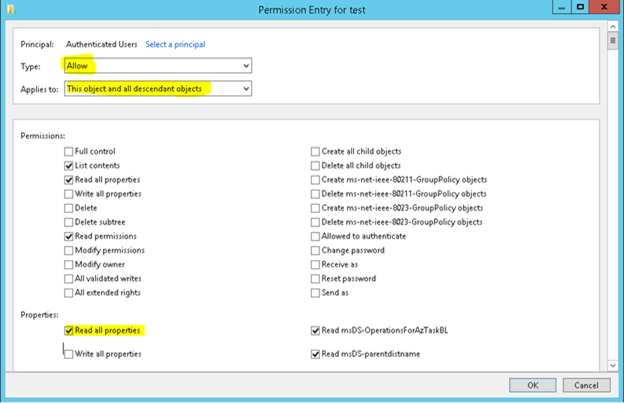
  6. Select Authenticated Users name, and then click Edit.
  7. Make sure that the Type is set to Allow and that the Applies to: box is set to This object and all descendant objects.
  8. Make sure Read all.
Properties check box in Properties section is checked.


Happening

Upgrade from AX 2012 to Latest Dynamics 365 Finance and Operation

Below are the steps defined by sequence. 1. Create new Upgrade project in Dynamics LCS. 2. Create VSTS Project and connect it with L...

Trending now