Friday, June 22, 2018

Production picking list reservation through X++

Reserve without changing dimension.
 dtProdBOMReserve(Args _args)   
 {   
   prodJournalBOM prodJournalBOM;
   InventUpd_Reservation reservation;   
   ;   

   select * from prodJournalBOM    
    where prodJournalBOM.RecId == 5637695365;   

   movement = InventMovement::construct(prodJournalBOM);   
   reserveQuantity = prodJournalBOM.BOMConsump - abs(movement.transIdSum().reserved());  
   if(reserveQuantity)
   {
     reservation = InventUpd_Reservation::newMovement(movement,-reserveQuantity,true);   
     reservation.updateNow();  
   } 
   info('Reserved.');   
  }   

Reserve for specific dimension.


static void dtProdBOMReserveWithDim(Args _args)  
 {  
   prodJournalBOM prodJournalBOM;;  
   InventDim InventDim;  
   InventUpd_Reservation reservation;  
   ;  
   select * from prodJournalBOM  
     where prodJournalBOM.RecId == 5637695365;  

   //Update dimension
   inventDim = prodJournalBOM.inventDim();  
   inventDim.wMSLocationId = '12420301';  

   movement = InventMovement::construct(prodJournalBOM);  

   reserveQuantity = prodJournalBOM.BOMConsump - abs(movement.transIdSum().reserved()); 
 
   if(reserveQuantity)
   {
     reservation = InventUpd_Reservation::newInventDim(movement,inventDim, -reserveQuantity,false);  
     reservation.updateNow();  
   }

   info('Reserved.');  
 }  

Monday, June 18, 2018

Cache weight item

Below method is to check, if cache weight is enabled or not for a particular Item.

AX 2012

Dynamics 365 Operations


Saturday, June 16, 2018

All the users in domain are not available to import.

When we are running Active Directory Import Wizard in Microsoft Dynamics AX. All the users in domain might not be available to import.

Link below is the solution for the same.

https://blogs.msdn.microsoft.com/axsupport/2016/11/01/cannot-see-all-users-on-the-domain-in-active-directory-import-wizard/

Below steps are described on above mentioned link.
  1. In Active Directory Users and Computers, make sure that Advanced Features is selected under the View menu option.
  2. Right-click the user that you cannot see when you run the import wizard. Then, select Properties.
  3. Click the Security tab.
  4. Click Authenticated Users group.
  5. Click the Advanced button.
  6. Select Authenticated Users name, and then click Edit.
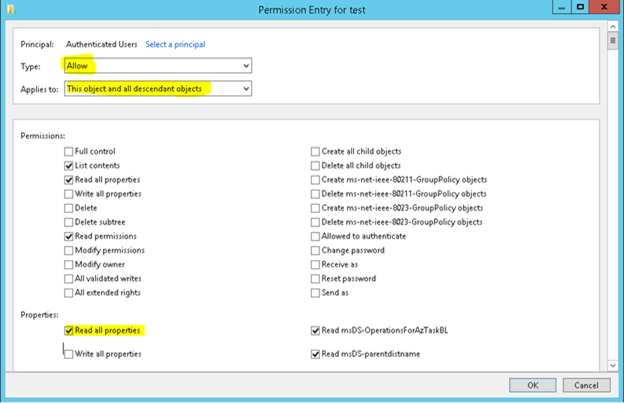
  7. Make sure that the Type is set to Allow and that the Applies to: box is set to This object and all descendant objects.
  8. Make sure Read all.
Properties check box in Properties section is checked.


Thursday, June 14, 2018

Unit conversion AX 2012/ D365FO

Code below can be used for unit conversion with rounding.
 public SalesQty dtConvert(Qty _salesQty,ItemId _itemId,SalesUnit _inventUnit,SalesUnit _salesUnit )  
 {  
      SalesQty salesQty;  
      salesQty = UnitOfMeasureConverter::convert(_salesQty,  
               UnitOfMeasure::unitOfMeasureIdBySymbol(_inventUnit),  
               UnitOfMeasure::unitOfMeasureIdBySymbol(_salesUnit),  
               NoYes::Yes,  
               InventTable::itemProduct(_itemId),  
               NoYes::Yes);  
     return salesQty;  
 }  

Saturday, June 9, 2018

SQL Currently running queries

Execute below query to find currently running queries in SQL.

This can be helpful to identify blocking.

SELECT
      cast(axsess.context_info AS VARCHAR(128)) AS [Connection info],
      req.session_id
   ,blocking_session_id
      ,req.status
      ,req.total_elapsed_time / 1000.0 AS total_elapsed_time
      ,req.wait_type
   ,ses.host_name     
   ,DB_NAME(req.database_id) AS DB_NAME     
      ,sqltext.text     
   ,ses.login_name 
   ,req.command
   ,req.start_time
   ,req.cpu_time 
   ,req.command   
 FROM  sys.dm_exec_requests req
 CROSS APPLY sys.dm_exec_sql_text(sql_handle) AS sqltext
 JOIN  sys.dm_exec_sessions ses
     ON ses.session_id = req.session_id
      join 
  ---cast(axsess.context_info AS VARCHAR(128)) AS [Connection info] , *
  sys.dm_exec_sessions axsess
 on axsess.session_id = req.session_id
 where DB_NAME(req.database_id) = db_name()
 --WHERE         
 --axsess.program_name LIKE '%Dynamics%'
 --and axsess.status = 'running' 
 --and req.wait_type IS NOT NULL
 --and req.wait_type = 'OLEDB'     

OData Date time filter D365 Finance and operations

Date Time filter
OldFormat
https://usnconeboxax1aos.cloud.onebox.dynamics.com/data/Vendors?cross-company=true&$filter=ModifiedDateTime ge DateTime'2018-06-07T09:13:28'
New Format
https://usnconeboxax1aos.cloud.onebox.dynamics.com/data/Vendors?cross-company=true&$filter=ModifiedDateTime gt 2018-06-07T23:59:59.99Z


String Filter
https://usnconeboxax1aos.cloud.onebox.dynamics.com/data/Vendors?cross-company=true&$filter=VendorAccountNumber eq '1001'

Wednesday, June 6, 2018

Job in dynamics 365 Finance and Operations


Below option is to create Runnable Class, which is job in AX 2012 R3.


This will create class with static method as below.

As this class have only static method, this will execute without creating object of class, which is same as job.

To debug this job, set current project as start up project as well as current job class as start up object.


From Debug menu, select option Start Debugging.

This will hit break point.


Happening

Upgrade from AX 2012 to Latest Dynamics 365 Finance and Operation

Below are the steps defined by sequence. 1. Create new Upgrade project in Dynamics LCS. 2. Create VSTS Project and connect it with L...

Trending now