Showing posts with label AX 2012. Show all posts

Monday, December 2, 2019

The command-line parameter -compressionminsize=1024 is invalid.

While starting AX client, you may face error as below.

Error "The command-line parameter -compressionminsize=1024 is invalid."


Reason & Solution

One of the reason for this error is, you are using AX server configuration file.

Create new client configuration file using "Client configuration" utility, which should work fine.

Also, let me know, if you find any other Reason/Solution for this error.

Monday, May 6, 2019

Duplicate records in Dynamics 365 Operations using X++


Example below can be used as sample code to find duplicate records from table using X++, either in AX 2012 or Dynamics 365 for finance and operations.

static void rdWrkCtrValidationDupRecords(Args _args)
{
    rdWrkCtrValidation  wrkCtrValidation;

    while select count(RecId) from wrkCtrValidation
        group by wrkCtrValidation.WrkCtrId
    {
        if(wrkCtrValidation.RecId >1)
        info(strFmt('%1 - %2',wrkCtrValidation.WrkCtrId, wrkCtrValidation.RecId));
    }

}

Query in SQL for similar requirement.

SELECT

    WRKCTRID,OUTPUT,COUNT(*)
FROM
    rdWrkCtrValidation
GROUP BY
    WRKCTRID,OUTPUT
HAVING
    COUNT(*) > 1


Tuesday, April 30, 2019

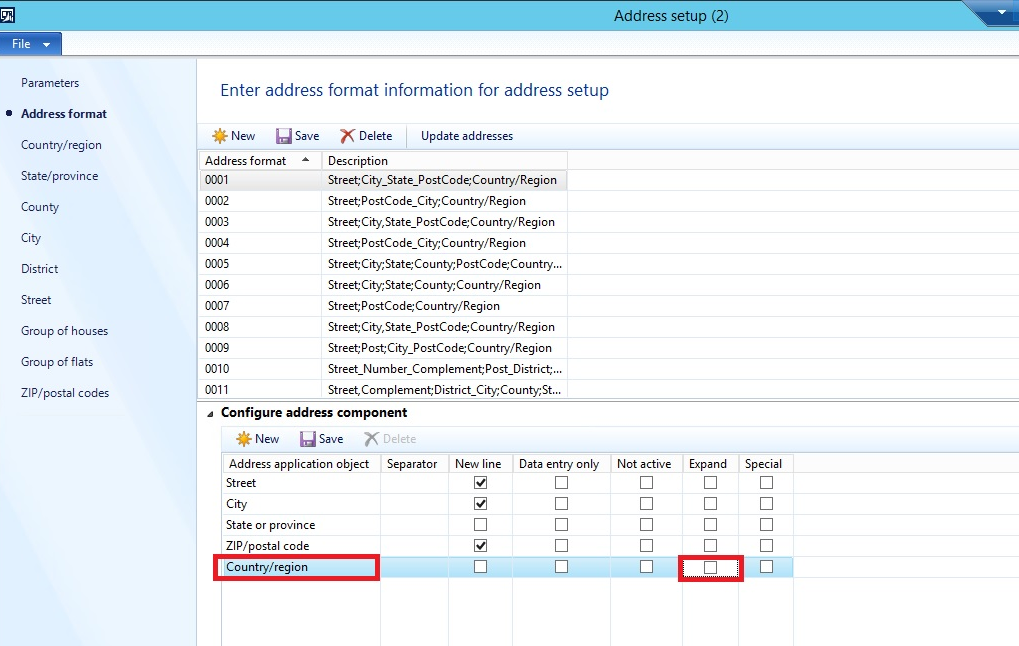
Address column Formatting in LogisticsPostalAddress table AX 2012


Issue/behavior

We have noticed that some of the records in table LogisticsPostalAddress column Address stores actually %1 instead of Country/Region.

If we review Address column using table browser, we might not able to notice this behavior due to PostLoad method on LogisticsPostalAddress table.

To review this, either comment method below in PostLoad method or review using SSMS.
DirUtility::replaceAddressToken(this);

What can be the issue due to this behavior?

1. When we are using this field for the integration, this will pass on %1 to other system.
2. To Print address on reports, if we are using bulk operation (Insert_Recordset) instead of row by row (while select) operation, it will show %1 on report/print.

Can we handle this behavior without code? - Yes

When we have selected Expand option in address format – DAX will store %1 instead of Country/Region in Address column of LogisticsPostalAddress address. 
BUT
If we have not selected Expand option in address format – DAX will store Country/Region Code instead of %1. i.e. CA instead of CANADA, so wherever we refer this field it will pass on CA instead of CANADA


Let me know, if you have any more inputs for the same.


Wednesday, April 17, 2019

AX 2012 Form flickering issue


One of our customers was facing an issue with Sales order page flickering issue in AX 2012 RTM.

As per Microsoft support teams’ suggestions, they suggested to upgrade it to Latest application and Kernal version to solve the issue. As we were not convinced to upgrade due to this issue only.
So, I was searching for an solution and come across following useful links,

In our case we changed Tab Page style from Fast tabs to Tabs helped us to solve the issue.

Before:

After:


Thursday, April 11, 2019

Print call stack in infolog AX 2012

Below piece of code can be used to print call stack.

In case of exception/error, we can put this piece of code just before a code which is causing issue.

info(con2Str(xSession::xppCallStack()));


Execute SQLStatement in AX 2012


Below is code example to demonstrate that, SQL queries can be directly executed from AX 2012 to improve performance in some cases.

str sqlStatement = strFmt(@"
    IF NOT EXISTS (SELECT 1 FROM INFORMATION_SCHEMA.TABLES WHERE TABLE_SCHEMA = N'dbo' AND TABLE_NAME = 'ModelElement')
    BEGIN
        CREATE TABLE [dbo].[ModelElement](
            [ElementType] [int] NOT NULL DEFAULT (0),
            [RootHandle] [int] NOT NULL DEFAULT (0),
            [ParentHandle] [int] NOT NULL DEFAULT (0),
            [ElementHandle] [int] IDENTITY(1,1) NOT NULL,
            [Name] [nvarchar](255) COLLATE SQL_Latin1_General_CP1_CI_AS NOT NULL DEFAULT (''),
            [AxId] [int] NOT NULL  DEFAULT (0),
            [ParentId] [int] NULL  DEFAULT (0),
            [Origin] [uniqueidentifier] NULL,
            [PartOfInheritance] [INT] NOT NULL DEFAULT (0),
            CONSTRAINT [PK_ModelElement_ElementHandle] PRIMARY KEY CLUSTERED
            (
                [ElementHandle] ASC
            ),
            CONSTRAINT [I_ModelElement_ElementId] UNIQUE NONCLUSTERED
            (
                [ElementType] ASC,
                [AxId] ASC,
                [ParentHandle] ASC,
                [Name] ASC
            ),
            CONSTRAINT [I_ModelElement_ElementName] UNIQUE NONCLUSTERED
            (
                [ElementType] ASC,
                [Name] ASC,
                [ParentHandle] ASC
            )
        )

        CREATE UNIQUE INDEX I_ModelElement_NameOrderList ON [dbo].ModelElement( ParentHandle, ElementType, Name )
        INCLUDE ( AxId )

        --    CREATE INDEX I_ModelElement_HandleOrderList ON ModelElement( ParentHandle, ElementType, AxId )

        CREATE UNIQUE INDEX I_ModelElement_ParentHandle ON [dbo].ModelElement(ParentHandle, ElementHandle)

        CREATE NONCLUSTERED INDEX [I_ModelElementRecursions] ON [dbo].[ModelElement]
        (
            [ParentHandle] ASC,
            [ElementHandle] ASC,
            [ElementType] ASC
        )
        INCLUDE
        (
             [AxId],
             [Name]
        )

        CREATE NONCLUSTERED INDEX [I_ReadHeaderExt] ON [dbo].[ModelElement]
        (
            [ElementType] ASC,
            [ParentHandle] ASC,
            [AxId] ASC
        )
        INCLUDE (
            [ElementHandle],
            [Name],
            [Origin]
        )

        CREATE NONCLUSTERED INDEX [I_RootHandle] ON [dbo].[ModelElement]
        (
            [RootHandle]
        )

        CREATE UNIQUE INDEX [I_ModelElement_Id1Id2] ON [dbo].[ModelElement] (ElementType, ParentId, AxId)
        WHERE (ParentId <> 0 AND AxId <> 0)
    END
    ELSE
    BEGIN
        DELETE FROM ModelElement;
    END");

    Connection  sessionConn = new Connection();
    Statement   statement = sessionConn.createStatement();

    new SqlStatementExecutePermission(sqlStatement).assert();

    statement.executeUpdate(sqlStatement);
    CodeAccessPermission::revertAssert();

Wednesday, March 20, 2019

Update SQLDictionary table AX 2012

Use below sample queries to update SQLDICTIONARY table to resolve field id conflict in AX 2012.

select * from SQLDICTIONARY where TABLEID = 0

select * from SQLDICTIONARY where TABLEID = 0 and NAME = 'XYZ'

select * from SQLDICTIONARY where TABLEID = 0 and FIELDID = 0

update SQLDICTIONARY
set FIELDID = 0
where TABLEID = 0 and NAME = 'XYZ'

Thursday, March 14, 2019

AX 2012 report deployment error network path was not found

Error:
An error occurred: The network path was not found. If User Account Control (UAC) is enabled on the machine, close the application, and then click Run as Administrator


The deployment was aborted. You do not have privileges to deploy to server. For deployment, you must have administrator rights to the SQL Server Reporting Services (SSRS). Contact your administrator to deploy.

Solution 1 disable UAC
Change following registry key value from 1 to 0.
HKEY_LOCAL_MACHINE\SOFTWARE\Microsoft\Windows\CurrentVersion\policies\system 
EnableLUA 
REG_DWORD change value of this key from 1 to 0 to disable UAC

Solution 2
User does not have administrator rights on reporting services and/or on server where reporting services installed.

Solution 3
"Remote registry" services not running on reporting server.

Solution 4
In case of load balancing reporting services refer link - reference

Solution 5

In case you are deploying reports using PowerShell, use option SkipReportServerAdminCheck as below.

For All Reports : "Publish - AXReport -ReportName * -SkipReportServerAdminCheck"
For Single Report : "Publish -AXReport -ReportName CustTransList -SkipReportServerAdminCheck"

Solution 6
In case static IP is assigned to developer PC, remove default gateway & alternate  dns, can also help to solve this error.

Please let me know, if this helps you.
Also, comment if you have any other solution for the same.

Tuesday, March 12, 2019

Clear cache with code X++ Dynamics 365/AX 2012

Code below can be used to clear caches for Dynamics 365 for Operations as well as AX 2012.

In AX 2012, copy and past code below into Job to execute and clear cache.

In D365 create runnable class as below, set that class as startup object for the project, set that project as startup project for the solution and execute class.

class RunnableClassTest
{       
    /// <summary>
    /// Runs the class with the specified arguments.
    /// </summary>
    /// <param name = "_args">The specified arguments.</param>
    public static void main(Args _args)
    {
        xSession::removeAOC();
        SysTreeNode::refreshAll();
        SysFlushDictionary::main(null);
        SysFlushAOD::main(null);
        SysFlushData::main(null);
        //SysBPCheckAIFDataObject::flushCache(true); // only for AX 2012
        SysFlushReportServer::main(null);
        SysFlushSystemSequence::main(null);
        xSession::updateAOC();
        info("Executed.");
    }

}

Monday, March 11, 2019

Expression in query ranges example Dynamics 365/AX 2012


Override form lookup method along with OR condition in query range.

public void lookup(FormControl _formControl, str _filterStr)
{
    //super(_formControl, _filterStr);
    SysTableLookup sysTableLookup = SysTableLookup::newParameters(tableNum(InventLocation),_formControl);
    Query query = New Query();
    QueryBuildDataSource queryBuildDataSource = query.addDataSource(tableNum(InventLocation));
    QueryBuildRange queryBuildRange;
    ;

    sysTableLookup.addLookupfield(fieldNum(InventLocation, InventLocationId));
    sysTableLookup.addLookupfield(fieldNum(InventLocation, Name));
    sysTableLookup.addLookupfield(fieldNum(InventLocation, InventSiteId));

    queryBuildRange = queryBuildDataSource.addRange(fieldNum(InventLocation, RecId));
    queryBuildRange.value(strFmt('((InventLocationType == %1) || (InventLocationType == %2))',
                            any2int(InventLocationType::Standard),
                            any2int(InventLocationType::Transit)));
  
    sysTableLookup.parmQuery(query);
    sysTableLookup.performFormLookup();
}

Saturday, March 9, 2019

Deploy AX 2012 R3 environment on Azure

AX 2012/Dynamics 365 operations Performance monitoring related links.

To troubleshoot performance of AX 2012 or Dynamics 365 operations, i am collecting some helpful links on this post.

I will keep updating this blogs as and when required accordingly.

Performance monitoring:

https://blogs.msdn.microsoft.com/axinthefield/ax-performance-monitor-101-setup-perfmon-for-continuous-monitoring-with-rolling-files/

Disk:
https://blogs.technet.microsoft.com/josebda/2014/10/13/diskspd-powershell-and-storage-performance-measuring-iops-throughput-and-latency-for-both-local-disks-and-smb-file-shares/

https://blogs.msdn.microsoft.com/axinthefield/assessing-your-disk-performance-and-your-needs-collecting-relevant-data-part-1/

https://blogs.msdn.microsoft.com/axinthefield/assessing-your-disk-performance-and-your-needs-analyzing-collected-data-part-2/

AX 2012

Performance dashboard
https://blogs.msdn.microsoft.com/axinthefield/3-powershell-scripts-for-dynamics-ax-refresh-report-and-monitor/

AX 2012 Forms performance
https://blogs.msdn.microsoft.com/axinthefield/how-to-measure-the-performance-of-the-dynamics-ax-2012-forms/

Client Access log: (how often they are accessing forms)
https://blogs.msdn.microsoft.com/axperf/2011/10/14/client-access-log-dynamics-ax-2012/

Friday, March 8, 2019

Try catch examples D365/AX 2012

   
Generic try catch example, which will give detailed information about error can be used in AX 2012 as well as D365 for operations.

     try
     {

     }
     catch (Exception::CLRError)
     {
            ex = ClrInterop::getLastException();
            if (ex != null)
            {
                ex = ex.get_InnerException();
                if (ex != null)
                {
                    error(ex.ToString());
                }
            }
    }
    catch (Exception::Error)
    {
        info(ppAutoInventRegister::getErrorStr());
    }
    

    public static server str getErrorStr()
    {
        SysInfologEnumerator enumerator;
        SysInfologMessageStruct msgStruct;
        Exception exception;
        str error;
        enumerator = SysInfologEnumerator::newData(infolog.cut());
        while (enumerator.moveNext())
        {
            msgStruct = new SysInfologMessageStruct(enumerator.currentMessage());
            exception = enumerator.currentException();
            error = strfmt("%1 %2", error, msgStruct.message());
        }
        return error;
    }

Saturday, February 23, 2019

Frequently used functions in D365 operations

Below listed are some frequently used functions in AX 2012, AX 2012 R2/R3, Dynamics 365 operations

1) Print text using label ids.
SysLabel::labelId2String2(literalStr("@DPL1228"))

2)

The clocks on the client and server machines are skewed.

The clocks on the client and server machines are skewed. error reports showing label IDs instead of text.

There was issue after restarting DAX servers, where Microsoft SQL Server Reporting Services (SSRS) reports were showing label IDs instead of text. 

Reviewed event Viewer and looked at Windows Logs > Application to see any related errors. The error was as:

AXRDCE The AXRDCE extension caught an unexpected exception for report CustBasedata.Report.
The error message was:
A call to the Microsoft Dynamics AX SRSFrameworkService service failed. The clocks on the client and server machines are skewed.

Also, while running reports from DAX error was "The clocks on the client and server machines are skewed."

Search results online showed that there was an issue with time synchronization.

To resolve this error, execute command [net time /set /yes] and restarted SQL Server Reporting Services service.

Friday, February 22, 2019

num2Str example AX 2012/Dynamics 365

Below is sample example for the function num2str

static void dtformatNum(Args _args)
{
    real lineNum = 5.69;
    int d = 0;
    ;
    while ((d < 10) && (lineNum != str2num( num2str(lineNum,1,d,1,0) ) ))
        d++;

    info(num2str(lineNum, 1, d, 1, 0));

}

Enum String functions AX 2012

Enum to String conversion using label values.

str dtGetZeroValueReasonCode()
{
    DictEnum        dictEnum;
    int             valueIndex;
    int             enumId;
    str             labelId; 
    str             reasonCode;
    ;

    enumId      = enumNum(rdZeroWeightReasonCode);
    dictEnum    = new DictEnum(enumId);

    if (dictEnum)
    {
        for (valueIndex = 0 ; valueIndex < dictEnum.values(); valueIndex++)
        {         
            labelId = dictEnum.index2LabelId(valueIndex);
            reasonCode += strFmt('%1;',SysLabel::labelId2String(labelId) ? SysLabel::labelId2String(labelId) : dictEnum.index2Label(valueIndex));
        }
    }

    // Remove the trailing ";" if it exist
    if (reasonCode != "")
    {
        reasonCode = strDel(reasonCode,strLen(reasonCode),1);
    } 

    return reasonCode;
}

retrieve enum name from string

zeroWeightReasonCodeStr = zeroWeightReasonCodeElement.innerText();
zeroWeightReasonCode = str2Enum(zeroWeightReasonCode, zeroWeightReasonCodeStr);

Tuesday, December 25, 2018

Add Financial default dimension on form AX 2012

Followings are some useful links to understand Financial default dimension on Form AX 2012.

1) https://www.intergen.co.nz/blog/Tim-Schofield/dates/2011/12/how-to-add-a-financial-dimension-in-ax-2012/
2) https://community.dynamics.com/ax/b/mukeshhirwani_dynamicsax/archive/2012/09/07/how-add-financial-dimension-on-forms-inside-ax2012
3) https://dynamicscognizance.wordpress.com/2017/02/02/adding-financial-dimensions-of-form-ax-2012/
4) http://www.axdeveloperconnection.it/webapp/blog/financial-dimension-control-no-data-source

Wednesday, July 25, 2018

Create and release product variant Dynamics 365

Code below can be used to create and release product variant in Dynamics AX 2012 & Dynamics 365 Operations.

It will work straight forwardly for AX 2012.

For Dynamics 365 operations,you need to create runable class to execute the same.

I have checked and tested that below code is working fine in dynamics 365 operations for different application but not to import data.

As all the classes and tables used below are available in Dynamics 365 operations, it should work to import as well.

Awaiting for feedback, if any!
 static void dtReleaseProductAllVariant(Args _args)  
 {  
   ecoResDistinctProductVariant    ecoResDistinctProductVariant;  
   EcoResProductVariantDimensionValue EcoResProductVariantDimensionValue;  
   RefRecId              ecoResDistinctProductVariantRecId;  
   EcoResProductReleaseManagerBase   releaseManager;  
   container              productDimensions;  
   EcoResProduct            ecoResProduct;  
   EcoResProductDimensionAttribute   prodDimensionAttribute; //fix for perticular dim, using tableid  
   //Configuration  
   EcoResProductMasterConfiguration  productMasterConfiguration;  
   EcoResConfiguration         ecoResConfiguration;  
   //Color  
   EcoResProductMasterColor      productMasterColor;  
   EcoResColor             ecoResColor;  
   //Size  
   EcoResProductMasterSize       productMasterSize;  
   EcoResSize             ecoResSize;  
   //Style  
   EcoResProductMasterStyle      productMasterStyle;  
   EcoResStyle             ecoResStyle;  
   CommaTextIo         file;  
   container          rec;  
   Dialog       d;  
   DialogField     df1, df2;  
   int64        counter = 0;  
   ;  
   d = new Dialog("Release Product Variant");  
   df1 = d.addField(ExtendedTypeStr("FilenameOpen"));  
   if (d.run())  
   {  
     file = new CommaTextIo(df1.value(), 'r');  
     file.inFieldDelimiter(';');  
     try  
     {  
       while (file.status() == IO_Status::Ok)  
       {  
         rec = file.read();  
         if(!rec)  
           break;  
           ttsBegin;  
           ecoResProduct = EcoResProduct::findByProductNumber(conPeek(rec, 1));  
           //Configuration - Start  
           ecoResConfiguration = EcoResConfiguration::findByName(conPeek(rec, 2));  
           if (!ecoResConfiguration.RecId)  
           {  
             ecoResConfiguration.Name = conPeek(rec, 2);  
             ecoResConfiguration.insert();  
           }  
           select * from productMasterConfiguration where productMasterConfiguration.Configuration == ecoResConfiguration.RecId &&  
                             productMasterConfiguration.ConfigProductMaster == ecoResProduct.RecId;  
           if(!productMasterConfiguration.RecId)  
           {  
             select * from prodDimensionAttribute where prodDimensionAttribute.DimensionTableId == tableNum(EcoResConfiguration);  
             productMasterConfiguration.Configuration              = ecoResConfiguration.RecId;  
             productMasterConfiguration.ConfigProductDimensionAttribute     = prodDimensionAttribute.RecId;  
             productMasterConfiguration.ConfigProductMaster           = ecoResProduct.RecId;  
             productMasterConfiguration.insert();  
           }  
           //Configuration - End  
           //Size - Start  
           ecoResSize = EcoResSize::findByName(conPeek(rec, 3));  
           if (!ecoResSize.RecId)  
           {  
             ecoResSize.Name = conPeek(rec, 3);  
             ecoResSize.insert();  
           }  
           select * from productMasterSize where productMasterSize.Size == ecoResSize.RecId &&  
                             productMasterSize.SizeProductMaster == ecoResProduct.RecId;  
           if(!productMasterSize.RecId)  
           {  
             select * from prodDimensionAttribute where prodDimensionAttribute.DimensionTableId == tableNum(EcoResSize);  
             productMasterSize.Size              = ecoResSize.RecId;  
             productMasterSize.SizeProductDimensionAttribute  = prodDimensionAttribute.RecId;  
             productMasterSize.SizeProductMaster        = ecoResProduct.RecId;  
             productMasterSize.insert();  
           }  
           //Size - End  
           //Color - Start  
           ecoResColor = EcoResColor::findByName(conPeek(rec, 4));  
           if (!ecoResColor.RecId)  
           {  
             ecoResColor.Name = conPeek(rec, 4);  
             ecoResColor.insert();  
           }  
           select * from productMasterColor where productMasterColor.color == ecoResColor.RecId &&  
                             productMasterColor.ColorProductMaster == ecoResProduct.RecId;  
           if(!productMasterColor.RecId)  
           {  
             select * from prodDimensionAttribute where prodDimensionAttribute.DimensionTableId == tableNum(EcoResColor);  
             productMasterColor.Color              = ecoResColor.RecId;  
             productMasterColor.ColorProductDimensionAttribute  = prodDimensionAttribute.RecId;  
             productMasterColor.ColorProductMaster        = ecoResProduct.RecId;  
             productMasterColor.insert();  
           }  
           //Color - End  
           //Style - Start  
           ecoResStyle = EcoResStyle::findByName(conPeek(rec, 5));  
           if (!ecoResStyle.RecId)  
           {  
             ecoResStyle.Name = conPeek(rec, 5);  
             ecoResStyle.insert();  
           }  
           select * from productMasterStyle where productMasterStyle.Style == ecoResStyle.RecId &&  
                             productMasterStyle.StyleProductMaster == ecoResProduct.RecId;  
           if(!productMasterStyle.RecId)  
           {  
             select * from prodDimensionAttribute where prodDimensionAttribute.DimensionTableId == tableNum(EcoResStyle);  
             productMasterStyle.Style              = ecoResStyle.RecId;  
             productMasterStyle.StyleProductDimensionAttribute  = prodDimensionAttribute.RecId;  
             productMasterStyle.StyleProductMaster        = ecoResProduct.RecId;  
             productMasterStyle.insert();  
           }  
           //Style - End  
           //Create a container to hold dimension values  
           productDimensions = EcoResProductVariantDimValue::getDimensionValuesContainer(conPeek(rec, 2),  
                                                   conPeek(rec, 3),  
                                                   conPeek(rec, 4),  
                                                   conPeek(rec, 5));  
           //Create Product search name  
           ecoResDistinctProductVariant.DisplayProductNumber = EcoResProductNumberBuilderVariant::buildFromProductNumberAndDimensions(  
                                             conPeek(rec, 1),  
                                             productDimensions);  
           //Create Product variant with Product and dimensions provided  
           ecoResDistinctProductVariantRecId = EcoResProductVariantManager::createProductVariant(ecoResProduct.RecId,  
                                             ecoResDistinctProductVariant.DisplayProductNumber,  
                                             productDimensions);  
           //Find newly created Product Variant  
           ecoResDistinctProductVariant = ecoResDistinctProductVariant::find(ecoResDistinctProductVariantRecId);  
           //Now release the Product variant  
           releaseManager = EcoResProductReleaseManagerBase::newFromProduct(ecoResDistinctProductVariant);  
           releaseManager.release();  
           counter++;  
           ttsCommit;  
         info(strFmt("%1 Product variant released successfully",conPeek(rec, 1)));  
         info(strFmt("Total %1 Product variants released successfully",counter));  
       }  
     }  
     catch  
     {  
       info(strFmt("Total %1 Product variants released successfully",counter));  
       info(strFmt("Job terminated for product %1 and config %2 Size %3 Color %4 Style %5",conPeek(rec, 1),conPeek(rec, 2),conPeek(rec, 3),conPeek(rec, 4),conPeek(rec, 5)));  
     }  
   }  
 }  

Happening

Upgrade from AX 2012 to Latest Dynamics 365 Finance and Operation

Below are the steps defined by sequence. 1. Create new Upgrade project in Dynamics LCS. 2. Create VSTS Project and connect it with L...

Trending now